 Quad
Quad
Free Chrome extension for YouTube TV
Watch four YouTube TV channels at once on your computer.
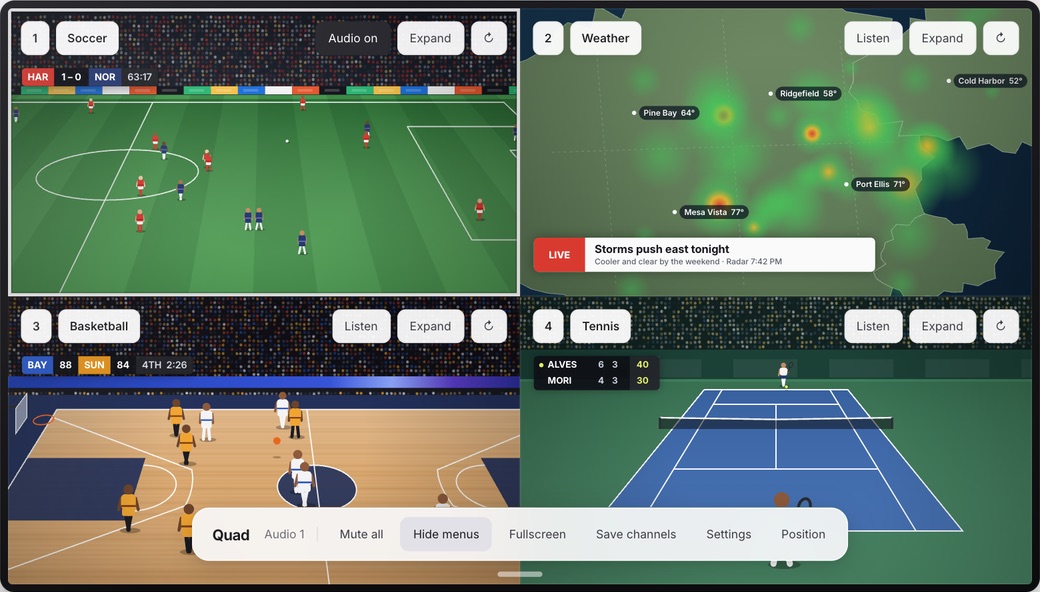
Quad is a Chrome extension I built for watching more than one game at a time on a laptop or desktop. Pick up to four channels, they fill the screen in a grid, and you click whichever one you want to hear.
Add to ChromeFree. You'll need a YouTube TV subscription.
Quad at a glance
- What it is
- A Chrome extension that shows up to four YouTube TV channels at once, in one fullscreen grid or in separate windows
- Works on
- Chrome 110 or newer, on a desktop or laptop
- You need
- An active YouTube TV subscription. Quad doesn't include any channels.
- Price
- Free. No ads, no account, no upgrades.
- Players
- 2, 3 or 4
- Sound
- One player at a time. Click Listen or press 1–4 to switch.
- Privacy
- Settings stay in your browser. No analytics, nothing sent to me.
- Current version
- 1.4.1
- Made by
- Henry, an independent developer. Not affiliated with Google or YouTube.
How to watch multiple YouTube TV channels in Chrome
- Add Quad from the Chrome Web Store.
- Sign in to YouTube TV in Chrome if you aren't already.
- Click the Quad icon in your toolbar and choose Open fullscreen.
- Pick a channel in each player and hit play.
- To change which one you hear, click Listen on it or press 1–4. The rest stay muted.
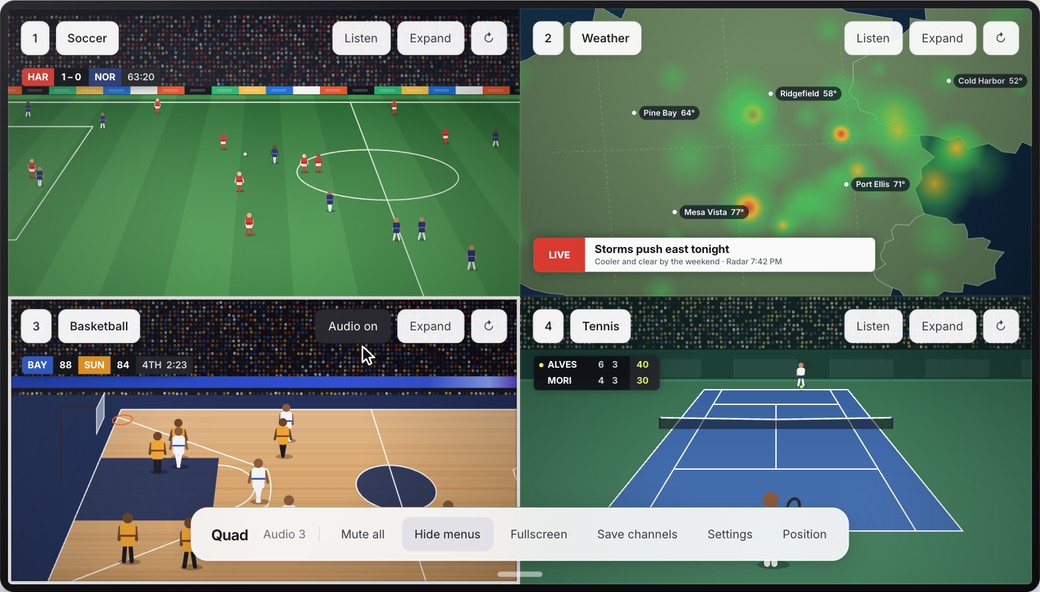
You don't have to use four. Two or three works too, and there's a focus layout that gives the main game more room. You can also drag the layout around yourself. If you'd rather skip fullscreen, Quad can open four regular windows instead, on whichever display you choose.
Not sure whether you even need an extension? I wrote up every way to get YouTube TV multiview on a computer, including doing it by hand.
Keyboard shortcuts
These work inside the grid. You can change any of them in Quad's settings.
| Key | What it does |
|---|---|
| 1–4 | Hear that player |
| ← → | Previous or next player's sound |
| M | Mute or unmute everything |
| E | Expand the player you're hearing to full screen, or go back to the grid |
| Esc | Go back to the grid from an expanded player |
| C | Hide or show the channel menus |
| F | Toggle fullscreen |
Doesn't YouTube TV already do this?
Sort of. YouTube TV has its own multiview, and since April 2026 you can build one from any four live channels. It's good. But it's for TVs, streaming boxes and the phone app. On tv.youtube.com in a browser you still get one channel at a time.
So on the couch, use YouTube's. At your desk or on a laptop, that's where Quad comes in.
| Feature | YouTube TV multiview | Quad |
|---|---|---|
| Works on | TVs, streaming devices, phones | Chrome on a desktop or laptop |
| Pick your own channels | Yes, live channels | Yes |
| Layouts | YouTube's preset layouts | 2, 3 or 4 players, a focus layout, or drag your own |
| Separate windows | No | Yes, on whichever display you pick |
| Cost | Included with YouTube TV | Free, needs YouTube TV |
What Quad doesn't do
- It doesn't give you channels. You only get what's in your YouTube TV plan.
- It doesn't sync the players. Each one is its own stream, so they can be a few seconds apart.
- It doesn't get around YouTube TV's stream limits, blackouts or ads.
- It doesn't play sound from two players at once. One at a time, on purpose.
- It isn't on phones, tablets or TVs. Desktop Chrome only.
FAQ
Is Quad free?
Yes. There's nothing to buy and no ads. You do need your own YouTube TV subscription, since Quad just arranges the players you already have.
Do I need a YouTube TV subscription?
Yes. Quad doesn't come with any channels. You get whatever is in your plan, add-ons included. Ads, blackouts and location rules work the same as they normally do.
Can I watch YouTube TV multiview in a web browser?
Not with YouTube TV's own multiview. It runs on TVs, streaming devices and the mobile apps, but tv.youtube.com in a browser plays one channel at a time. Quad adds a multiview grid to Chrome on a computer. You can also arrange windows by hand.
Does it work on Mac and Windows?
It works anywhere desktop Chrome 110 or newer runs. It doesn't work on phones or tablets.
Does each player count as a separate stream?
Yes. Each player is its own stream, so YouTube TV's usual limit on how many streams you can watch at once still applies.
Why are the games a few seconds apart?
Each player buffers on its own, so one can run a few seconds ahead of another. You might see a score change on one screen right before the play happens on another.
Will my computer keep up?
Depends on the computer. Four streams take a lot more CPU, memory and bandwidth than one. If things get choppy, try three players, or switch to separate windows.
Can I use it with two monitors?
Yes. Quad lets you pick which display the grid or the four windows open on.
Does Quad see my account or what I watch?
No. Your lineup and settings stay in Chrome on your computer. There's no account, no analytics, and nothing gets sent to me. The privacy policy has the details.
Is Quad made by YouTube?
No. It's an independent extension and isn't affiliated with or endorsed by Google or YouTube.
Something's not working. Who do I tell?
Email me at h@henrys.place. Tell me what you were trying to do and what happened instead. Quad can also attach a short technical report if you want, which doesn't include your channels or account info.
Updated